Process an Image
Submit an image containing math, text, tables, or chemistry diagrams and get back structured content as Mathpix Markdown, LaTeX, HTML, or other formats.
What you can process
- Math equations (printed and handwritten)
- Text with math (mixed content)
- Tables (structured tabular data)
- Chemistry diagrams (returned as SMILES notation)
- Documents (multi-line content with layout)
Enable document layout for page images
Images sent directly to v3/text retain snippet-oriented recognition by default. For a full page image, send "enable_document_layout": true to preserve structures such as nested lists and pseudocode in Mathpix Markdown. Snip enables document layout automatically for screenshots; there is no client setting to configure.
Document-layout pseudocode uses \begin{lstlisting} by default. If you render MMD yourself, use mathpix-markdown-it 2.0.29 or newer (3.0.0 is recommended); older versions can omit listing content. Set "disable_lstlisting": true to receive standard fenced code blocks instead, with math left as plain text. Set "disable_itemize": true to receive lists as plain lines with the marker kept inline (\\-separated rows inside tables) instead of \begin{itemize} environments. Document layout also recognizes QR codes; because include_page_info defaults to true for v3/text, detected QR codes are returned as cropped images unless page info is disabled.
Send an image URL
Send an image URL to the v3/text endpoint:

- mpxpy
- cURL
- Python
- JavaScript / TypeScript
- Go
- Java
from mpxpy.mathpix_client import MathpixClient
client = MathpixClient(app_id="APP_ID", app_key="APP_KEY")
image = client.image_new(
    url="https://mathpix-ocr-examples.s3.amazonaws.com/cases_hw.jpg"
)
# Get Mathpix Markdown
print(image.mmd())
# Get line-by-line OCR data
print(image.lines_json())
curl -X POST https://api.mathpix.com/v3/text \
-H 'app_id: APP_ID' \
-H 'app_key: APP_KEY' \
-H 'Content-Type: application/json' \
--data '{"src": "https://mathpix-ocr-examples.s3.amazonaws.com/cases_hw.jpg", "math_inline_delimiters": ["$", "$"], "rm_spaces": true}'
import requests, json
r = requests.post("https://api.mathpix.com/v3/text",
    json={
        "src": "https://mathpix-ocr-examples.s3.amazonaws.com/cases_hw.jpg",
        "math_inline_delimiters": ["$", "$"],
        "rm_spaces": True
    },
    headers={
        "app_id": "APP_ID",
        "app_key": "APP_KEY",
        "Content-type": "application/json"
    }
)
print(json.dumps(r.json(), indent=4, sort_keys=True))
const response = await fetch("https://api.mathpix.com/v3/text", {
  method: "POST",
  headers: {
    app_id: "APP_ID",
    app_key: "APP_KEY",
    "Content-Type": "application/json",
  },
  body: JSON.stringify({
    src: "https://mathpix-ocr-examples.s3.amazonaws.com/cases_hw.jpg",
    math_inline_delimiters: ["$", "$"],
    rm_spaces: true,
  }),
});
const result = await response.json();
console.log(JSON.stringify(result, null, 2));
body := bytes.NewBufferString(`{
    "src": "https://mathpix-ocr-examples.s3.amazonaws.com/cases_hw.jpg",
    "math_inline_delimiters": ["$", "$"],
    "rm_spaces": true
}`)
req, _ := http.NewRequest("POST", "https://api.mathpix.com/v3/text", body)
req.Header.Set("app_id", "APP_ID")
req.Header.Set("app_key", "APP_KEY")
req.Header.Set("Content-Type", "application/json")
resp, _ := http.DefaultClient.Do(req)
defer resp.Body.Close()
result, _ := io.ReadAll(resp.Body)
fmt.Println(string(result))
HttpClient client = HttpClient.newHttpClient();
String body = """
    {
      "src": "https://mathpix-ocr-examples.s3.amazonaws.com/cases_hw.jpg",
      "math_inline_delimiters": ["$", "$"],
      "rm_spaces": true
    }
    """;
HttpRequest request = HttpRequest.newBuilder()
    .uri(URI.create("https://api.mathpix.com/v3/text"))
    .header("app_id", "APP_ID")
    .header("app_key", "APP_KEY")
    .header("Content-Type", "application/json")
    .POST(HttpRequest.BodyPublishers.ofString(body))
    .build();
HttpResponse<String> response = client.send(request, HttpResponse.BodyHandlers.ofString());
System.out.println(response.body());
{
  "auto_rotate_confidence": 0,
  "auto_rotate_degrees": 0,
  "confidence": 1,
  "confidence_rate": 1,
  "image_height": 332,
  "image_width": 850,
  "is_handwritten": true,
  "is_printed": false,
  "latex_styled": "f(x)=\\left\\{\\begin{array}{ll}\nx^{2} & \\text { if } x<0 \\\\\n2 x & \\text { if } x \\geq 0\n\\end{array}\\right.",
  "request_id": "14b53567-9f6c-4895-ab3d-e4a8ae18f9c1",
  "text": "$f(x)=\\left\\{\\begin{array}{ll}x^{2} & \\text { if } x<0 \\\\ 2 x & \\text { if } x \\geq 0\\end{array}\\right.$",
  "version": "SuperNet-200"
}
In the example response, the latex_styled field renders as:
Send an image file
Upload an image file to the v3/text endpoint via multipart form-data:
- mpxpy
- cURL
- Python
- JavaScript / TypeScript
- Go
- Java
from mpxpy.mathpix_client import MathpixClient
client = MathpixClient(app_id="APP_ID", app_key="APP_KEY")
image = client.image_new(file_path="cases_hw.jpg")
print(image.mmd())
curl -X POST https://api.mathpix.com/v3/text \
-H 'app_id: APP_ID' \
-H 'app_key: APP_KEY' \
--form 'file=@"cases_hw.jpg"' \
--form 'options_json="{\"math_inline_delimiters\": [\"$\", \"$\"], \"rm_spaces\": true}"'
import requests, json
r = requests.post("https://api.mathpix.com/v3/text",
    files={"file": open("cases_hw.jpg","rb")},
    data={
      "options_json": json.dumps({
        "math_inline_delimiters": ["$", "$"],
        "rm_spaces": True
      })
    },
    headers={
        "app_id": "APP_ID",
        "app_key": "APP_KEY"
    }
)
print(json.dumps(r.json(), indent=4, sort_keys=True))
import fs from "fs";
const form = new FormData();
form.append("file", new Blob([fs.readFileSync("cases_hw.jpg")]));
form.append("options_json", JSON.stringify({
  math_inline_delimiters: ["$", "$"],
  rm_spaces: true,
}));
const response = await fetch("https://api.mathpix.com/v3/text", {
  method: "POST",
  headers: { app_id: "APP_ID", app_key: "APP_KEY" },
  body: form,
});
console.log(await response.json());
var buf bytes.Buffer
w := multipart.NewWriter(&buf)
fw, _ := w.CreateFormFile("file", "cases_hw.jpg")
f, _ := os.Open("cases_hw.jpg")
io.Copy(fw, f)
f.Close()
w.WriteField("options_json", `{"math_inline_delimiters":["$","$"],"rm_spaces":true}`)
w.Close()
req, _ := http.NewRequest("POST", "https://api.mathpix.com/v3/text", &buf)
req.Header.Set("app_id", "APP_ID")
req.Header.Set("app_key", "APP_KEY")
req.Header.Set("Content-Type", w.FormDataContentType())
resp, _ := http.DefaultClient.Do(req)
defer resp.Body.Close()
result, _ := io.ReadAll(resp.Body)
fmt.Println(string(result))
HttpClient client = HttpClient.newHttpClient();
Path file = Path.of("cases_hw.jpg");
String boundary = "----FormBoundary" + System.currentTimeMillis();
String optionsJson = "{\"math_inline_delimiters\": [\"$\", \"$\"], \"rm_spaces\": true}";
byte[] fileBytes = Files.readAllBytes(file);
ByteArrayOutputStream baos = new ByteArrayOutputStream();
baos.write(("--" + boundary + "\r\nContent-Disposition: form-data; name=\"file\"; filename=\""
    + file.getFileName() + "\"\r\nContent-Type: application/octet-stream\r\n\r\n").getBytes());
baos.write(fileBytes);
baos.write(("\r\n--" + boundary + "\r\nContent-Disposition: form-data; name=\"options_json\"\r\n\r\n"
    + optionsJson + "\r\n--" + boundary + "--\r\n").getBytes());
HttpRequest request = HttpRequest.newBuilder()
    .uri(URI.create("https://api.mathpix.com/v3/text"))
    .header("app_id", "APP_ID")
    .header("app_key", "APP_KEY")
    .header("Content-Type", "multipart/form-data; boundary=" + boundary)
    .POST(HttpRequest.BodyPublishers.ofByteArray(baos.toByteArray()))
    .build();
HttpResponse<String> response = client.send(request, HttpResponse.BodyHandlers.ofString());
System.out.println(response.body());
When sending an image file, all options are sent as stringified JSON in a top-level options_json parameter.
Request data and HTML formats
Request multiple output formats from the v3/text endpoint in a single call:
- Request body
- cURL
- Python
- JavaScript / TypeScript
- Go
- Java
{
  "src": "https://mathpix-ocr-examples.s3.amazonaws.com/cases_hw.jpg",
  "formats": ["text", "data", "html"],
  "data_options": {
    "include_asciimath": true,
    "include_latex": true
  }
}
curl -X POST https://api.mathpix.com/v3/text \
-H 'app_id: APP_ID' \
-H 'app_key: APP_KEY' \
-H 'Content-Type: application/json' \
--data '{"src": "https://mathpix-ocr-examples.s3.amazonaws.com/cases_hw.jpg", "formats": ["text", "data", "html"], "data_options": {"include_asciimath": true, "include_latex": true}}'
import requests, json
r = requests.post("https://api.mathpix.com/v3/text",
    json={
        "src": "https://mathpix-ocr-examples.s3.amazonaws.com/cases_hw.jpg",
        "formats": ["text", "data", "html"],
        "data_options": {"include_asciimath": True, "include_latex": True}
    },
    headers={
        "app_id": "APP_ID",
        "app_key": "APP_KEY",
        "Content-type": "application/json"
    }
)
print(json.dumps(r.json(), indent=4, sort_keys=True))
const response = await fetch("https://api.mathpix.com/v3/text", {
  method: "POST",
  headers: {
    app_id: "APP_ID",
    app_key: "APP_KEY",
    "Content-Type": "application/json",
  },
  body: JSON.stringify({
    src: "https://mathpix-ocr-examples.s3.amazonaws.com/cases_hw.jpg",
    formats: ["text", "data", "html"],
    data_options: { include_asciimath: true, include_latex: true },
  }),
});
const result = await response.json();
console.log(JSON.stringify(result, null, 2));
body := bytes.NewBufferString(`{
    "src": "https://mathpix-ocr-examples.s3.amazonaws.com/cases_hw.jpg",
    "formats": ["text", "data", "html"],
    "data_options": {"include_asciimath": true, "include_latex": true}
}`)
req, _ := http.NewRequest("POST", "https://api.mathpix.com/v3/text", body)
req.Header.Set("app_id", "APP_ID")
req.Header.Set("app_key", "APP_KEY")
req.Header.Set("Content-Type", "application/json")
resp, _ := http.DefaultClient.Do(req)
defer resp.Body.Close()
result, _ := io.ReadAll(resp.Body)
fmt.Println(string(result))
HttpClient client = HttpClient.newHttpClient();
String body = """
    {
      "src": "https://mathpix-ocr-examples.s3.amazonaws.com/cases_hw.jpg",
      "formats": ["text", "data", "html"],
      "data_options": { "include_asciimath": true, "include_latex": true }
    }
    """;
HttpRequest request = HttpRequest.newBuilder()
    .uri(URI.create("https://api.mathpix.com/v3/text"))
    .header("app_id", "APP_ID")
    .header("app_key", "APP_KEY")
    .header("Content-Type", "application/json")
    .POST(HttpRequest.BodyPublishers.ofString(body))
    .build();
HttpResponse<String> response = client.send(request, HttpResponse.BodyHandlers.ofString());
System.out.println(response.body());
{
  "request_id": "054135c6-fca6-4a46-8f74-2814fa13dc8e",
  "version": "SuperNet-200",
  "is_printed": false,
  "is_handwritten": true,
  "confidence": 1,
  "confidence_rate": 1,
  "text": "\\( f(x)=\\left\\{\\begin{array}{ll}x^{2} & \\text { if } x<0 \\\\ 2 x & \\text { if } x \\geq 0\\end{array}\\right. \\)",
  "html": "<div><span class=\"math-inline\">...</span></div>",
  "data": [
    {
      "type": "asciimath",
      "value": "f(x)={[x^(2),\" if \"x < 0],[2x,\" if \"x >= 0]:}"
    },
    {
      "type": "latex",
      "value": "f(x)=\\left\\{\\begin{array}{ll}x^{2} & \\text { if } x<0 \\\\ 2 x & \\text { if } x \\geq 0\\end{array}\\right."
    }
  ]
}
The response includes a text field, an html field, and a data array with both asciimath and latex representations, as requested via the formats and data_options parameters. The latex value in the data array renders as:
Get line-by-line data
Set the include_line_data request parameter on the v3/text endpoint to get per-line results with position contours, useful for overlaying results on the original image.
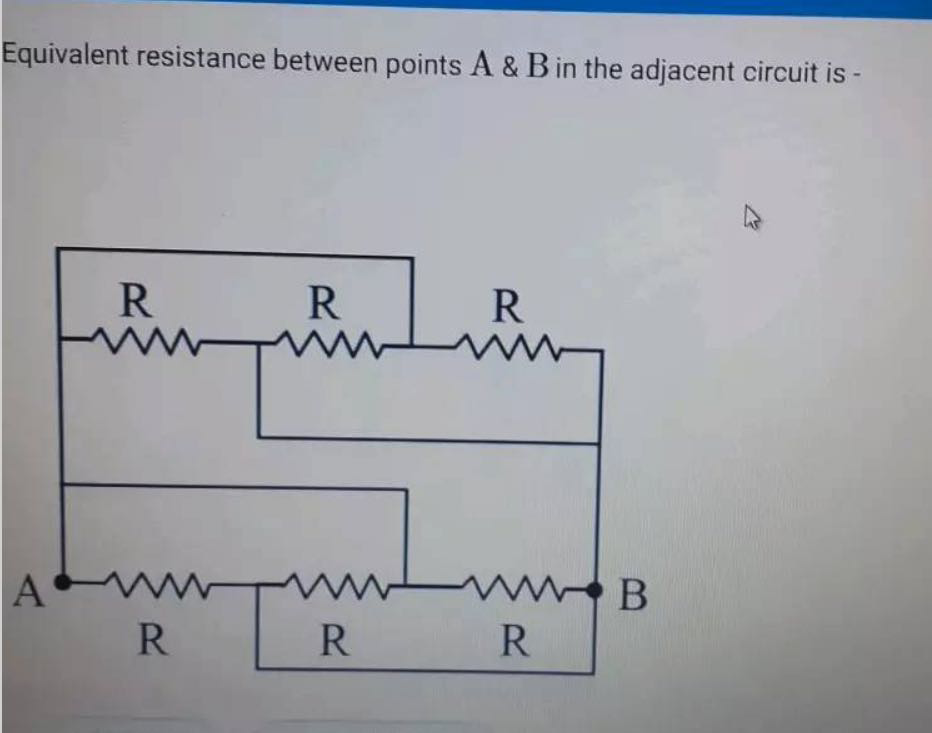
- Request body
- cURL
- Python
- JavaScript / TypeScript
- Go
- Java
{
  "src": "https://mathpix.com/examples/text_with_diagram.png",
  "formats": ["text"],
  "include_line_data": true
}
curl -X POST https://api.mathpix.com/v3/text \
-H 'app_id: APP_ID' \
-H 'app_key: APP_KEY' \
-H 'Content-Type: application/json' \
--data '{"src": "https://mathpix.com/examples/text_with_diagram.png", "formats": ["text"], "include_line_data": true}'
import requests, json
r = requests.post("https://api.mathpix.com/v3/text",
    json={
        "src": "https://mathpix.com/examples/text_with_diagram.png",
        "formats": ["text"],
        "include_line_data": True
    },
    headers={
        "app_id": "APP_ID",
        "app_key": "APP_KEY",
        "Content-type": "application/json"
    }
)
print(json.dumps(r.json(), indent=4, sort_keys=True))
const response = await fetch("https://api.mathpix.com/v3/text", {
  method: "POST",
  headers: {
    app_id: "APP_ID",
    app_key: "APP_KEY",
    "Content-Type": "application/json",
  },
  body: JSON.stringify({
    src: "https://mathpix.com/examples/text_with_diagram.png",
    formats: ["text"],
    include_line_data: true,
  }),
});
const result = await response.json();
console.log(JSON.stringify(result, null, 2));
body := bytes.NewBufferString(`{
    "src": "https://mathpix.com/examples/text_with_diagram.png",
    "formats": ["text"],
    "include_line_data": true
}`)
req, _ := http.NewRequest("POST", "https://api.mathpix.com/v3/text", body)
req.Header.Set("app_id", "APP_ID")
req.Header.Set("app_key", "APP_KEY")
req.Header.Set("Content-Type", "application/json")
resp, _ := http.DefaultClient.Do(req)
defer resp.Body.Close()
result, _ := io.ReadAll(resp.Body)
fmt.Println(string(result))
HttpClient client = HttpClient.newHttpClient();
String body = """
    {
      "src": "https://mathpix.com/examples/text_with_diagram.png",
      "formats": ["text"],
      "include_line_data": true
    }
    """;
HttpRequest request = HttpRequest.newBuilder()
    .uri(URI.create("https://api.mathpix.com/v3/text"))
    .header("app_id", "APP_ID")
    .header("app_key", "APP_KEY")
    .header("Content-Type", "application/json")
    .POST(HttpRequest.BodyPublishers.ofString(body))
    .build();
HttpResponse<String> response = client.send(request, HttpResponse.BodyHandlers.ofString());
System.out.println(response.body());
{
  "auto_rotate_confidence": 0,
  "auto_rotate_degrees": 0,
  "confidence": 0.6602140300674364,
  "confidence_rate": 0.9949494895122919,
  "image_height": 733,
  "image_width": 932,
  "is_handwritten": false,
  "is_printed": true,
  "line_data": [
    {
      "after_hyphen": false,
      "cnt": [[0,77],[0,32],[867,54],[865,98]],
      "confidence": 0.6602140300674364,
      "confidence_rate": 0.9949494895122919,
      "conversion_output": true,
      "id": "1177a9c84cba4101ad53c10053113218",
      "included": true,
      "is_handwritten": false,
      "is_printed": true,
      "text": "Equivalent resistance between points \\( A \\) \\& \\( B \\) in the adjacent circuit is -",
      "type": "text"
    },
    {
      "cnt": [[6,243],[652,243],[652,683],[6,683]],
      "conversion_output": false,
      "error_id": "image_not_supported",
      "id": "0c78ec14187d4193be93a9d30182efba",
      "included": false,
      "is_handwritten": false,
      "is_printed": true,
      "type": "diagram"
    }
  ],
  "request_id": "3c37d6b3-e3fe-4b85-9aeb-0d8d8a104679",
  "text": "Equivalent resistance between points \\( A \\) \\& \\( B \\) in the adjacent circuit is -",
  "version": "SuperNet-200"
}
For this example response, the line_data array contains two elements, one for each detected region in the image:
-
The first element has
"type": "text"and contains the recognized sentence in itstextfield, along with acntarray describing the polygon contour around that region. Thetextfield renders as:Equivalent resistance between points A & B in the adjacent circuit is -
-
The second element has
"type": "diagram". Because the OCR engine detects diagrams but does not convert them to text, it returns"error_id": "image_not_supported"and"included": false.
The cnt arrays contain polygon coordinates that describe the boundary of each detected region. The API returns these coordinates as raw data - the visualization below is rendered here for illustration only:
cnt polygon coordinates overlaid on the input image. Blue: text region. Orange: diagram region. The API returns the raw coordinates - rendering is up to your application.Get word-by-word data
Set the include_word_data request parameter on the v3/text endpoint to get per-word results with position contours.
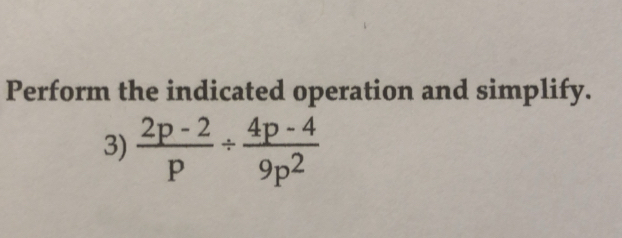
- Request body
- cURL
- Python
- JavaScript / TypeScript
- Go
- Java
{
  "src": "https://mathpix.com/examples/text_with_math_0.jpg",
  "include_word_data": true
}
curl -X POST https://api.mathpix.com/v3/text \
-H 'app_id: APP_ID' \
-H 'app_key: APP_KEY' \
-H 'Content-Type: application/json' \
--data '{"src": "https://mathpix.com/examples/text_with_math_0.jpg", "include_word_data": true}'
import requests, json
r = requests.post("https://api.mathpix.com/v3/text",
    json={
        "src": "https://mathpix.com/examples/text_with_math_0.jpg",
        "include_word_data": True
    },
    headers={
        "app_id": "APP_ID",
        "app_key": "APP_KEY",
        "Content-type": "application/json"
    }
)
print(json.dumps(r.json(), indent=4, sort_keys=True))
const response = await fetch("https://api.mathpix.com/v3/text", {
  method: "POST",
  headers: {
    app_id: "APP_ID",
    app_key: "APP_KEY",
    "Content-Type": "application/json",
  },
  body: JSON.stringify({
    src: "https://mathpix.com/examples/text_with_math_0.jpg",
    include_word_data: true,
  }),
});
const result = await response.json();
console.log(JSON.stringify(result, null, 2));
body := bytes.NewBufferString(`{
    "src": "https://mathpix.com/examples/text_with_math_0.jpg",
    "include_word_data": true
}`)
req, _ := http.NewRequest("POST", "https://api.mathpix.com/v3/text", body)
req.Header.Set("app_id", "APP_ID")
req.Header.Set("app_key", "APP_KEY")
req.Header.Set("Content-Type", "application/json")
resp, _ := http.DefaultClient.Do(req)
defer resp.Body.Close()
result, _ := io.ReadAll(resp.Body)
fmt.Println(string(result))
HttpClient client = HttpClient.newHttpClient();
String body = """
    {
      "src": "https://mathpix.com/examples/text_with_math_0.jpg",
      "include_word_data": true
    }
    """;
HttpRequest request = HttpRequest.newBuilder()
    .uri(URI.create("https://api.mathpix.com/v3/text"))
    .header("app_id", "APP_ID")
    .header("app_key", "APP_KEY")
    .header("Content-Type", "application/json")
    .POST(HttpRequest.BodyPublishers.ofString(body))
    .build();
HttpResponse<String> response = client.send(request, HttpResponse.BodyHandlers.ofString());
System.out.println(response.body());
{
  "is_printed": true,
  "is_handwritten": false,
  "auto_rotate_confidence": 0,
  "auto_rotate_degrees": 0,
  "word_data": [
    {
      "type": "text",
      "cnt": [[2, 74], [110, 74], [110, 104], [2, 104]],
      "text": "Perform",
      "confidence": 1,
      "confidence_rate": 1
    },
    {
      "type": "text",
      "cnt": [[118, 76], [158, 76], [158, 102], [118, 102]],
      "text": "the",
      "confidence": 1,
      "confidence_rate": 1
    },
    {
      "type": "math",
      "cnt": [[133, 190], [134, 110], [323, 112], [322, 192]],
      "text": "\\( \\frac{2 p-2}{p} \\div \\frac{4 p-4}{9 p^{2}} \\)",
      "confidence": 1,
      "confidence_rate": 1,
      "latex": "\\frac{2 p-2}{p} \\div \\frac{4 p-4}{9 p^{2}}"
    }
  ]
}
For this example response, the word_data array contains three elements. Each element includes a type field ("text" or "math"), a cnt array with the bounding polygon, and a latex field with the LaTeX representation:
"type": "text"- the word "Perform""type": "text"- the word "the""type": "math"- the math expression, whoselatexfield renders as:
Auto rotation
The v3/text endpoint automatically corrects images in the wrong orientation. Control auto rotation with the auto_rotate_confidence_threshold request parameter (default 0.65). Set to 1 to disable.


Next steps
- v3/text reference - Full request parameters, response schema, and data objects
- Authentication - How to get your API keys
- Process a Document - For multi-page documents