Accessible PDF
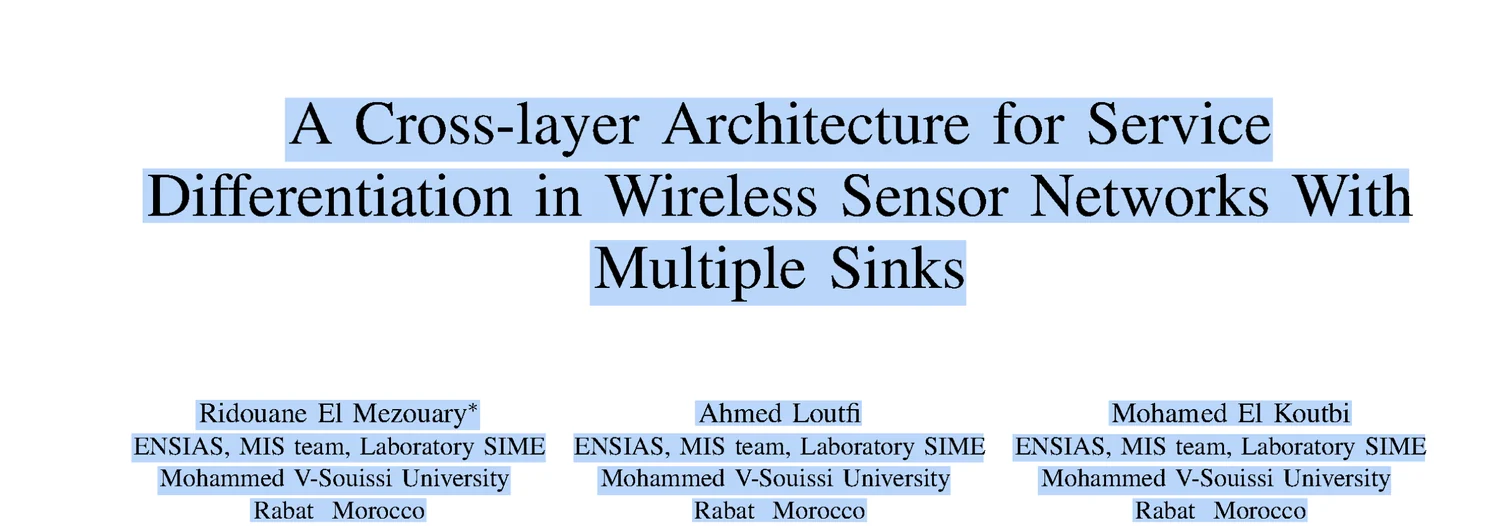
The mmd.overlay.pdf format returns the PDF you sent, with the recognized text added as an invisible layer at
the coordinates the text is printed at. The pages are untouched: same page count, same layout, same page numbers,
nothing visible changes.
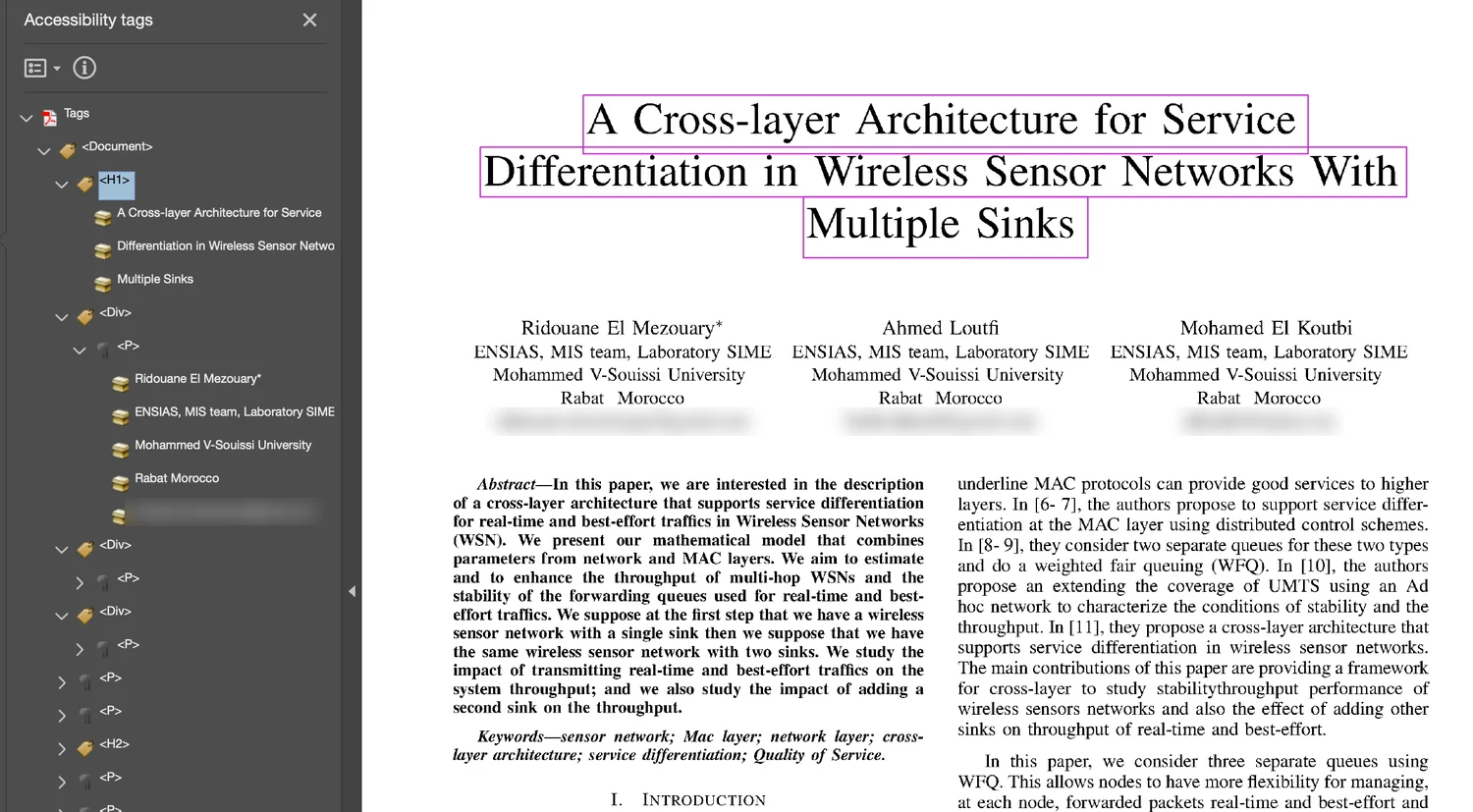
What the file gains is text. It becomes searchable and extractable, and by default it is tagged for PDF/UA so a screen reader reads the document instead of announcing it as an image.
Use this format when a document, such as a scanned book, a form, or a published paper, has to keep its original appearance and also be accessible.
Request it
curl -X POST https://api.mathpix.com/v3/pdf \
  -H "app_key: APP_KEY" \
  -F "file=@book.pdf" \
  -F 'options_json={"conversion_formats": {"mmd.overlay.pdf": true}}'
Download it like any other format once the document is done:
curl -X GET "https://api.mathpix.com/v3/pdf/PDF_ID.mmd.overlay.pdf" \
  -H "app_key: APP_KEY" -o book.accessible.pdf
The same body works on POST /files/v1, which is the endpoint to use for anything over 1 GB.
The format returns your own document with a layer added, so it needs a document you submitted to
/v3/pdf or /files/v1 to read the pages of. A standalone Mathpix Markdown conversion, which has no
such document, is refused with opts_without_pdf_id.
Options
Pass them under conversion_options, keyed by the format name:
curl -X POST https://api.mathpix.com/v3/pdf \
  -H "app_key: APP_KEY" \
  -F "file=@book.pdf" \
  -F 'options_json={
        "conversion_formats": {"mmd.overlay.pdf": true},
        "conversion_options": {"mmd.overlay.pdf": {
          "pdf_ua": 2,
          "title": "Introduction to Analysis",
          "language": "de"
        }}
      }'
See Conversion options for mmd.overlay.pdf for every field.
What a screen reader gets
In the default tagged mode the document carries a structure tree, not just text:
- Headings announce as headings, at the level the document uses.
- Tables announce a data cell with the column and row headings that govern it, where a heading row or column can be read off the table.
- Lists keep their numbering and nesting.
- Formulas are spoken rather than spelled out letter by letter.
- Running heads, folios and other furniture are marked as decoration, so they are not read on every page.
- The document's own table of contents is tagged as a contents list, each entry pointing at the heading it names. Headings also become the document outline, with jump destinations.
- Language is declared, so the reader uses the right voice.
Set accessible: false to get the older behaviour instead: the recognized text drawn as a plain invisible layer,
with no structure. That file is searchable but a screen reader cannot navigate it. Use it only if you specifically
want a searchable layer and nothing more.
Limits and behaviour worth knowing
- Request it when you submit the document. The conversion reads your original PDF, which is otherwise deleted
once the pages have been recognized. Asking for the format later returns
410 Gone. - File size increases. The added text layer and accessibility tags increase the file size. The increase varies by document.
- Born-digital PDFs are not double-layered. Where a page already prints its own text and it agrees with the recognition, that text is tagged where it stands rather than having ours drawn over it.
- A page printed sideways is given a layer along its print, so selection follows the words as displayed.
- Figures get a short alternative, not a description of the picture. Each figure is tagged with alt text built from its caption, the label the surrounding text cites it by, and the kind of figure: "Bar chart", "Diagram 20.2.5". Saying what the image actually depicts needs a vision model and is not done.